
Neocortex Group Director
Several characters sharing one conversation in Unity
Experimental
Group chat is currently an experimental feature. Its API and behavior may change in future SDK updates.
NeocortexGroupDirector runs a conversation across several characters. Each character keeps its own NeocortexSmartAgent on its own GameObject, with its own voice, animation and events. The director assembles them into a cast, sends one group turn, and routes every reply back to the character that said it.
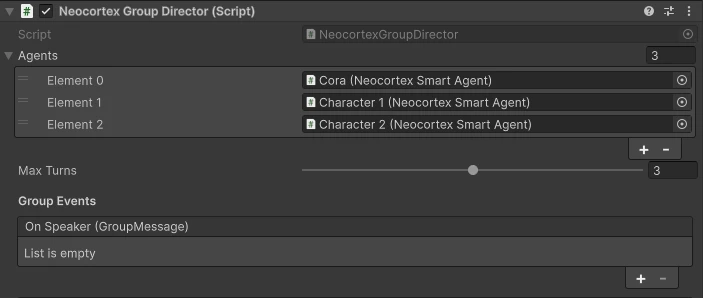
Setting up
- Put a
NeocortexGroupDirectoron an empty GameObject - Drag your characters into its Agents list
- Add a
NeocortexGroupChatUIon the same GameObject for the chat panel, input, thinking indicator and microphone
One UI for the whole cast
Use a single NeocortexGroupChatUI on the director. Do not also put a NeocortexChatUI on each character: every one of them would print the same replies again.
Adding an agent to the cast switches its Auto Voice Input off, because the director owns the microphone for the whole scene. Without that, every character in the cast would answer the player separately.
A cast of two or more characters needs a Pro or Team plan. A cast of one behaves like normal single character chat and works on any plan.
Methods
Send
The player speaks to the group. An AI director decides who answers and in what order, up to Max Turns speakers.
- Parameters:
- message: What the player said.
Send Example director.Send("Hi everyone, introduce yourselves");
SendTo
Addresses one character, skipping the director entirely when you already know who should answer. There is an overload taking a character id instead of an agent.
- Parameters:
- agent: The character that should answer, or characterId as a
string. - message: What the player said.
SendTo Example director.SendTo(alice, "Alice, what do you think?"); director.SendTo("cmrkiw4f100017k7sfnicq08e", "And you?"); - agent: The character that should answer, or characterId as a
Continue
Runs an ambient turn with no player input, so the cast talks among themselves. Also the natural thing to call right after the roster changes, so the others react to the arrival or departure immediately.
director.AddAgent(maya);
director.Continue();
SendAudio
Transcribes the player's recording, raises it on OnPlayerSpeech, then runs the turn with it. Ignored while a turn is already in flight.
- Parameters:
- clip: The recorded
AudioClip, typically fromNeocortexAudioReceiver.
SendAudio Example mic.OnAudioRecorded.AddListener((clip) => director.SendAudio(clip)); director.OnPlayerSpeech.AddListener((text) => chatPanel.AddMessage("You", text, true)); - clip: The recorded
AddAgent
Adds a character to the cast while the scene runs. The others are told: they greet the newcomer and start addressing them.
- Parameters:
- agent: The
NeocortexSmartAgentjoining the scene.
- agent: The
A late joiner is new to the conversation
A character that joins partway through only sees the transcript from the moment it joined. Anything said before it arrived is invisible to it, so a secret shared earlier stays secret.
RemoveAgent
Removes a character from the cast. The others stop addressing them and still know later that the character left, rather than assuming they are still there.
- Parameters:
- agent: The
NeocortexSmartAgentleaving the scene.
AddAgent and RemoveAgent Example director.AddAgent(maya); // Maya joins director.RemoveAgent(bram); // Bram leaves director.Continue(); // let the cast react right away - agent: The
ClearSession
Forgets the shared session id, so the next turn starts a fresh conversation.
director.ClearSession();GetHistory
The shared transcript, oldest first and name labelled per speaker. Also raised on OnHistoryReceived.
- Parameters:
- limit (optional): Messages per page. Defaults to
20. - before (optional): A
nextCursorfrom a previous page.
- limit (optional): Messages per page. Defaults to
- Returns:
Task<ApiChatHistory>GetHistory Example ApiChatHistory history = await director.GetHistory(20); foreach (ChatHistoryEntry entry in history.messages) { Debug.Log($"{entry.name ?? "Player"}: {entry.content}"); }
Events
OnSpeaker
Raised before each character speaks its turn. Use it for the shared transcript and name label.
- Arguments:
- message: The
GroupMessagefor this speaker,{ characterId, name, lines[], actions[], flowState }.
OnSpeaker Example director.OnSpeaker.AddListener((msg) => { string text = string.Join(" ", msg.lines.Select(l => l.text)); chatPanel.AddMessage(msg.name, text, false); }); - message: The
OnPlayerSpeech
Raised with the transcript of the player's spoken input, so the UI can show what they said.
- Arguments:
- message: The transcribed text.
OnPlayerSpeech Example director.OnPlayerSpeech.AddListener((text) => chatPanel.AddMessage("You", text, true));
OnTurnStarted
Raised when a turn begins. Lock your input field here while the cast talks.
director.OnTurnStarted.AddListener(() => textInput.interactable = false);OnTurnFinished
Raised when every speaker in the turn has finished. Release input here.
director.OnTurnFinished.AddListener(() => textInput.interactable = true);OnGroupResponseReceived
Raised once with the whole group turn, before the speakers are played out.
- Arguments:
- response: The
GroupChatResponse, carryingsessionIdand everyGroupMessagein speaking order.
OnGroupResponseReceived Example director.OnGroupResponseReceived.AddListener((response) => { Debug.Log($"{response.messages.Length} characters answered"); }); - response: The
OnHistoryReceived
Raised when GetHistory() returns, each entry name labelled.
- Arguments:
- messages: A
ChatHistoryEntry[]of past messages.
OnHistoryReceived Example director.OnHistoryReceived.AddListener((messages) => { foreach (var m in messages) chatPanel.AddMessage(m.name, m.content, m.sender == "USER"); }); - messages: A
OnRequestFailed
Raised when the turn fails.
- Arguments:
- error: The error message.
OnRequestFailed Example director.OnRequestFailed.AddListener((error) => Debug.LogError(error));
IsBusy is true while a turn is being fetched or played out, and sends are ignored during that window, so turns can never overlap. SessionId holds the shared scene session, empty until the server mints one on the first turn, and Agents is the current cast.
How replies are played
The director plays speakers strictly in order: it routes each message to its agent, waits for that character to finish, then starts the next. Every character therefore speaks with its own ChatLinesMode, AudioSource and animation events, exactly as it would in a single character scene.
Keeping turns tight
Max Turns caps how many characters speak per director turn, and SendTo skips the director entirely when you already know who should answer.