
Neocortex Interactable
Make objects in your scene part of what characters perceive
Add a NeocortexInteractable to any GameObject and it becomes part of what nearby characters can sense. Its properties and position go out with every message automatically, with no code.
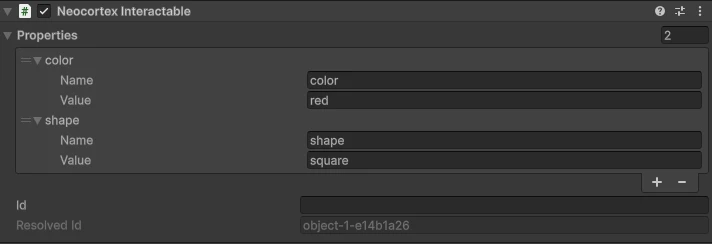
Describing an object
Everything descriptive about the thing, as free form name and value pairs: what it is, and its current state.
| Name | Value |
|---|---|
name | GameObject 1 |
shape | cube |
color | blue |
locked | false |
A name property is seeded from the GameObject the moment you add the component. Edit it, add more, or remove it entirely. There is no fixed schema, use the words your game already uses.
Name on the component returns that property's value, or an empty string if you removed it.
Identity
Characters reference entities by id, never by name, so two objects both called "Red Cube" stay distinguishable.
Leave the Id field empty and a short stable id is derived from the object's scene path, shown right below as Resolved Id. It survives across turns, so a character can refer back to the same object later in a conversation. Set the field yourself when you want a specific id, for example one that matches your own save data.
var interactable = cube.GetComponent<NeocortexInteractable>();
Debug.Log(interactable.Id);   // blue-cube-1a2b3c4d
Debug.Log(interactable.Name); // Blue Cube
Characters perceive each other
Put a NeocortexInteractable on a character's own GameObject and it links to that character automatically. The character then recognises that entry as itself and judges everything else relative to where it stands, and the other characters see it as a character rather than a prop.
If you do not add one, the agent still contributes its own position, so a character always knows where it is.
What gets sent
The agent gathers the interactables in the scene every time it sends a message, ordered nearest first from where the character stands and capped at 10 entities per turn, so a busy scene cannot blow up the prompt. Nothing to configure.
Send facts, let the character interpret
Positions go out raw. The SDK never pre-computes distance, direction or what is reachable. The character reads the coordinates and works out what is near, behind or worth acting on, which is why it handles phrasing you did not plan for, like the one by the door or the far one.
Acting on things
When a character triggers an action it carries the id of the entity it applies to, so a single reply can act on several different objects in order. See Actions.
agent.RegisterAction("GO_TO_CUBE", action =>
{
    // action.targetId is the id of the cube the character means
    ...
});
The character can only target something it actually perceives this turn. It cannot invent an object that is not in the scene.
Finding what was acted on
The reply carries your entities back in metadata, with isSubject marking whatever the actions targeted:
agent.OnChatResponseReceived.AddListener(response =>
{
    foreach (Interactable entity in response.metadata)
    {
        if (entity.isSubject) Debug.Log($"Acting on {entity.name}");
    }
});
The echo is built on the server from what was sent plus what the character targeted, so it always matches your scene. For anything you intend to move or animate, resolve the live object by targetId rather than using the echoed position:
foreach (ChatAction action in response.actions)
{
    NeocortexInteractable target = Find(action.targetId);
    if (target != null) Debug.Log($"{action.name} on {target.Name}");
}
Naming things well
The character talks about entities by name and never says an id out loud, so name things the way a person would say them. Properties are what let it tell similar things apart, so the blue one resolves when color: blue is there to read.