
Neocortex Smart Agent
Reference for the Neocortex Smart Agent component in Unity
NeocortexSmartAgent is the character. One per character, on that character's GameObject. It sends text and audio, raises the reply as events, and runs the actions the character asks for. An empty GameObject with a Smart Agent on it is already a working conversation: it opens the microphone by itself, answers, and listens again.
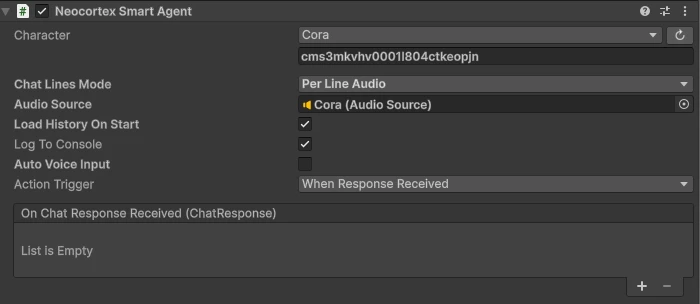
Inspector
| Field | Description |
|---|---|
| Character | Picked from a dropdown of the characters on your account. Stored as characterID, which you can also set from code. |
| Chat Lines Mode | How replies are delivered. See Chat lines. |
| Audio Source | Where voice clips play. Added for you when you pick an audio mode. |
| Load History On Start | Fetch this character's stored conversation on scene start and raise it through OnChatHistoryReceived. |
| Auto Voice Input | Listen through a microphone on this GameObject and answer on its own. On by default. See Talking to it with no wiring. |
| Action Trigger | When a reply's actions run. See Actions. |
Each one is a plain public field, so anything you set in the inspector you can set from code: agent.characterID, agent.chatLinesMode, agent.actionTrigger.
IsSpeaking is true while a reply is pending or its lines are still playing. Anything you send during that window is held and submitted when the reply finishes, so a player cannot talk over the character.
Methods
TextToText
Send a text message to the character, and expect a text reply.
- Parameters:
- message: The text message to send.
TextToText Example var agent = GetComponent<NeocortexSmartAgent>(); agent.OnChatResponseReceived.AddListener((response) => { Debug.Log($"Message: {response.message}"); Debug.Log($"Emotion: {response.emotion}"); Debug.Log($"Conversation Flow State: {response.flowState}"); }); agent.TextToText("Hello, Neocortex!");
TextToAudio
Send a text message to the character, and expect the reply spoken in its voice as well as written.
- Parameters:
- message: The text message to send.
TextToAudio Example var agent = GetComponent<NeocortexSmartAgent>(); agent.OnChatResponseReceived.AddListener((response) => { Debug.Log($"Message: {response.message}"); }); // Clips play through the agent's Audio Source automatically. agent.TextToAudio("Hello, Neocortex!");
AudioToText
Sends a recording to the character. It is transcribed, raised on OnTranscriptionReceived, then answered as text. Used together with the NeocortexAudioReceiver component when you drive the microphone yourself.
- Parameters:
- audioClip: The audio clip to send.
AudioToText Example var agent = GetComponent<NeocortexSmartAgent>(); agent.OnTranscriptionReceived.AddListener((message) => { Debug.Log($"You: {message}"); }); var audioReceiver = GetComponent<NeocortexAudioReceiver>(); audioReceiver.OnAudioRecorded.AddListener((audioClip) => { agent.AudioToText(audioClip); });
AudioToAudio
The same as AudioToText, with the reply spoken back as well.
- Parameters:
- audioClip: The audio clip to send.
AudioToAudio Example var audioReceiver = GetComponent<NeocortexAudioReceiver>(); audioReceiver.OnAudioRecorded.AddListener((audioClip) => { agent.AudioToAudio(audioClip); });
RegisterAction
Assigns the coroutine that performs an action keyword, as authored on the character's Actions node. The coroutine receives the ChatAction, so it knows which entity to act on, and the agent waits for it to finish before starting the next action. See Actions.
- Parameters:
- keyword: The action keyword, for example
GO_TO_LOCATION. - handler:
Func<ChatAction, IEnumerator>that performs it.
RegisterAction Example agent.RegisterAction("GO_TO_CUBE", GoToCube); agent.RegisterAction("WAVE", action => { animator.SetTrigger("Wave"); return null; }); - keyword: The action keyword, for example
GetChatHistory
Fetches the last messages of this character's stored conversation and raises them on OnChatHistoryReceived. Fire and forget.
- Parameters:
- limit (optional): The number of last messages to fetch. Defaults to
10.
GetChatHistory Example agent.OnChatHistoryReceived.AddListener((messages) => { foreach (var message in messages) { Debug.Log($"{message.sender}: {message.content}"); } }); agent.GetChatHistory(5); - limit (optional): The number of last messages to fetch. Defaults to
RequestChatHistory
The awaitable version, with paging. Pass the previous page's nextCursor as before to walk backwards through older messages. nextCursor is null once you reach the start of the conversation.
- Parameters:
- limit (optional): Messages per page. Defaults to
20. - before (optional): A
nextCursorfrom a previous page.
- limit (optional): Messages per page. Defaults to
- Returns:
Task<ApiChatHistory>RequestChatHistory Example ApiChatHistory page = await agent.RequestChatHistory(limit: 20); foreach (ChatHistoryEntry entry in page.messages) { Debug.Log($"{entry.name ?? "Player"}: {entry.content}"); } ApiChatHistory older = await agent.RequestChatHistory(20, page.nextCursor);
ChatHistoryEntry carries content, sender (USER or ASSISTANT), speakerCharacterId, name, addressedTo, emotion, actions and createdAt.
GenerateChatLineAudio
Generates a clip for a single line in the character's voice, without sending a message. Useful for pre-voicing a scripted line.
- Parameters:
- line: The
ChatLineto speak.
- line: The
- Returns:
Task<AudioClip>GenerateChatLineAudio Example AudioClip clip = await agent.GenerateChatLineAudio( new ChatLine { text = "Watch out!", emotion = Emotions.Alarmed });
Speak
Speaks a reply produced elsewhere through this character, raising the same line, emotion and action events as a normal reply. NeocortexGroupDirector calls it to hand each speaker its turn, so you rarely call it yourself.
- Parameters:
- message: The
GroupMessagethis character should speak.
- message: The
- Returns:
Task
Events
OnChatResponseReceived
Raised when the reply arrives, before any lines are played.
- Arguments:
- response: The
ChatResponsefor this turn.
OnChatResponseReceived Example agent.OnChatResponseReceived.AddListener((response) => { Debug.Log($"Message: {response.message}"); Debug.Log($"Emotion: {response.emotion}"); }); - response: The
OnChatLineStarted
Raised as each chat line drops in. Add it to your chat panel here.
- Arguments:
- line: The
ChatLinebeing delivered, with its owntextandemotion.
OnChatLineStarted Example agent.OnChatLineStarted.AddListener((line) => { chatPanel.AddMessage("Aria", line.text, false); }); - line: The
OnEmotionChanged
Raised with each line's emotion as it drops in. Drive animation here.
- Arguments:
- emotion: The
Emotionsvalue for the current line.
OnEmotionChanged Example agent.OnEmotionChanged.AddListener((emotion) => { animator.SetTrigger(emotion.ToString()); }); - emotion: The
OnComposingNextLine
Raised during the pause before the next line in Text mode, so a typing indicator can fill the gap. Not raised while a voice clip is playing, because the clip already paces the reply.
agent.OnComposingNextLine.AddListener(() => thinkingIndicator.Display(true));
agent.OnChatLineStarted.AddListener(_ => thinkingIndicator.Display(false));
OnReplyFinished
Raised once the whole reply has finished playing, audio included.
agent.OnReplyFinished.AddListener(() => Debug.Log("Character finished speaking"));OnActionsCompleted
Raised once every action of a reply has been run and the queue is empty.
agent.OnActionsCompleted.AddListener(() => Debug.Log("Finished acting"));OnTranscriptionReceived
Raised when the player's recorded speech has been transcribed.
- Arguments:
- message: The transcribed text.
OnTranscriptionReceived Example agent.OnTranscriptionReceived.AddListener((message) => { Debug.Log($"You: {message}"); });
OnAudioResponseReceived
Raised when a voice clip is ready. The agent plays clips through its own audioSource, so listen to this only when you want to handle playback yourself.
- Arguments:
- audioClip: The generated clip.
OnAudioResponseReceived Example agent.OnAudioResponseReceived.AddListener((audioClip) => { Debug.Log($"Clip length: {audioClip.length}"); });
OnChatHistoryReceived
Raised when stored history has loaded, either from GetChatHistory or from Load History On Start.
- Arguments:
- messages: A
ChatHistoryEntry[]of past messages, oldest first.
OnChatHistoryReceived Example agent.OnChatHistoryReceived.AddListener((messages) => { foreach (var message in messages) { chatPanel.AddMessage(message.name, message.content, message.sender == "USER"); } }); - messages: A
OnRequestFailed
Raised when a request to Neocortex fails.
- Arguments:
- error: The error message.
OnRequestFailed Example agent.OnRequestFailed.AddListener((error) => Debug.LogError(error));
Chat lines
A reply arrives as ordered chat lines: short chunks that drop in one after another as separate messages, each with its own emotion. Their text joined together is the full reply.
The Chat Lines Mode dropdown decides how they are delivered. The message drop is identical in every mode, the mode only decides the audio.
| Chat Lines Mode | What the player gets |
|---|---|
PerLineAudio (default) | Lines drop in and each one is voiced separately, in order. |
SingleAudio | Lines drop in while one voice plays for the whole reply. |
Text | Lines drop in as messages, emotion per line. No audio. |
Off | One reply, delivered whole in a single event, and your game plays the clip. |
The voice starts as it arrives. In both audio modes the character begins speaking within a fraction of a second of the reply landing, because the audio is played as it is generated rather than downloaded in full first. You do not configure this and there is nothing to turn on. Off is the exception: it hands your game a finished AudioClip to play itself, so it waits for the whole clip.
agent.chatLinesMode = ChatLinesMode.Text; // or SingleAudio / PerLineAudio / Off

agent.OnChatLineStarted.AddListener(line => chatPanel.AddMessage("Aria", line.text, false));
agent.OnEmotionChanged.AddListener(emotion => animator.SetTrigger(emotion.ToString()));
agent.OnReplyFinished.AddListener(() => Debug.Log("Character finished speaking"));
Picking an audio mode brings the pieces along
Choosing SingleAudio or PerLineAudio adds an AudioSource to the GameObject, and a NeocortexAudioReceiver if the scene has no microphone yet. Both are suggestions, not requirements: delete either one and it stays deleted. Setting an audio mode from code also gets an AudioSource at runtime.
Pacing in Text mode. With no audio to set the rhythm, the gap before each line is estimated from its length, so a reply arrives at a readable pace instead of appearing all at once. OnComposingNextLine fires during each gap, and NeocortexChatUI uses it to show the thinking indicator, so the pause reads as the character typing.
Graceful degradation. PerLineAudio never fails outright: if the workspace cannot currently generate per-line audio it falls back to a single clip for the whole reply, and then to text only, so the scene keeps working. It also starts playing line 1 as soon as its clip is ready while later lines are still being synthesised, so the character starts speaking sooner.
Actions
Actions are the keywords you author on a character's Action nodes in the web platform. When the character decides to act, the reply carries them in the order it intends to perform them, each with the entity it applies to.
public class ChatAction
{
    public string name;      // The keyword, for example GO_TO_CUBE
    public string targetId;  // The perceived entity it applies to, "" when none
}
Because every action carries its own target, one reply can stack several actions across different objects. Ask a character to go to the blue cube, then the red one and you get two GO_TO_CUBE actions with two different targetIds.
Register a coroutine per keyword with RegisterAction. The agent runs them one at a time, in order, waiting for each to finish before starting the next.
using System.Collections;
using UnityEngine;
using Neocortex;
using Neocortex.Data;

public class CubeWalker : MonoBehaviour
{
    [SerializeField] private NeocortexSmartAgent agent;
    [SerializeField] private CharacterController character;

    private void Start()
    {
        agent.RegisterAction("GO_TO_CUBE", GoToCube);
    }

    private IEnumerator GoToCube(ChatAction action)
    {
        // Resolve the LIVE object by id, so it works even if the thing has moved
        NeocortexInteractable target = Find(action.targetId);
        if (target == null) yield break;

        while (Vector3.Distance(character.transform.position, target.transform.position) > 0.5f)
        {
            Vector3 direction = (target.transform.position - character.transform.position).normalized;
            character.Move(direction * (2f * Time.deltaTime));
            yield return null;
        }
    }

    private NeocortexInteractable Find(string id)
    {
        foreach (var i in FindObjectsByType<NeocortexInteractable>(FindObjectsSortMode.None))
        {
            if (i.Id == id) return i;
        }
        return null;
    }
}
Resolve the live object by id
Look the object up by targetId and use its current transform. What you sent described the world as it was when the message went out, so a moving object would be stale by the time the reply lands.
A keyword with no registered handler is skipped with a warning in the Console naming the keyword, so a missing handler is obvious rather than silent.
When actions run
The Action Trigger field decides when a reply's actions start:
| Action Trigger | Runs on | Feels like |
|---|---|---|
WhenResponseReceived (default) | The reply arriving | Acts immediately, possibly before it starts speaking |
WhenSpeechStarts | The first spoken line | Movement and voice begin together |
AfterReplySpoken | The reply finishing | Speaks the line, then acts |
agent.actionTrigger = ActionTrigger.WhenSpeechStarts;The speech triggers need audio
WhenSpeechStarts and AfterReplySpoken wait for speech events, which only exist in the audio chat lines modes. With Chat Lines Mode set to Off there is no speech to wait for, so the actions run on arrival instead and the Console warns once.
Reading actions yourself
You do not have to register handlers. The raw list is on the reply:
agent.OnChatResponseReceived.AddListener(response =>
{
    foreach (ChatAction action in response.actions)
    {
        Debug.Log($"{action.name} -> {action.targetId}");
    }
});
response.action is also there as the first action's name, for simple cases that only ever trigger one thing.
A character can only target something it actually perceives this turn, and can only use keywords you authored. Both are enforced on the server, so an action can never point at an object that is not in the scene. See Neocortex Interactable for how entities get their ids.
Talking to it with no wiring
With Auto Voice Input on, the agent opens the microphone on its own GameObject, sends what it hears, and listens again after every reply. An empty GameObject plus a Smart Agent is a working conversation with nothing else in the scene.
NeocortexChatUI and NeocortexGroupDirector switch it off automatically when they take over the microphone, so the player's input is never sent twice.
The reply
ChatResponse carries the current shape and a flattened view of it for convenience:
public class ChatResponse
{
    public ChatLine[] lines;        // The reply, 1 to 3 chunks, each with its own emotion
    public ChatAction[] actions;    // Actions triggered this turn, each with its target
    public string characterId;      // Who replied
    public string name;             // Their display name
    public string flowState;        // Conversation Flow checkpoint, empty when unused
    public Interactable[] metadata; // Your entities echoed back, isSubject marking the targets

    public string message;          // Every line's text joined
    public Emotions emotion;        // The first line's emotion
    public string action;           // The first action's name
}
ChatLine is { string text; Emotions emotion; }. See Neocortex Interactable for metadata.
Perception
The agent automatically sends what the character can sense with every message: every NeocortexInteractable in the scene plus its own position, nearest first and capped at 10 entities per turn so a busy scene cannot blow up the prompt. No code needed.
Sessions
Conversations are keyed by session id, stored per character by NeocortexSessionManager. Clear it to start fresh:
NeocortexSessionManager.CleanSessionID(agent.characterID);