
Team Management
Learn how to manage your team workspaces and collaborate in Neocortex
The Team Management feature provides a collaborative environment for teams to work together on projects without interfering with personal development workflows.
Note
Team Management is an exclusive feature available for Team Tier subscribers.
Dual Workspaces
When you subscribe to the Team Tier, you receive a second, dedicated Team Workspace alongside your existing Personal Workspace. This separation ensures that experimentation in your private area doesn't affect production-ready team projects.
- Personal Projects: Private and accessible only by you.
- Team Projects: Common to all team members; everyone can collaborate on the same agents, flows, and knowledge bases in real-time.
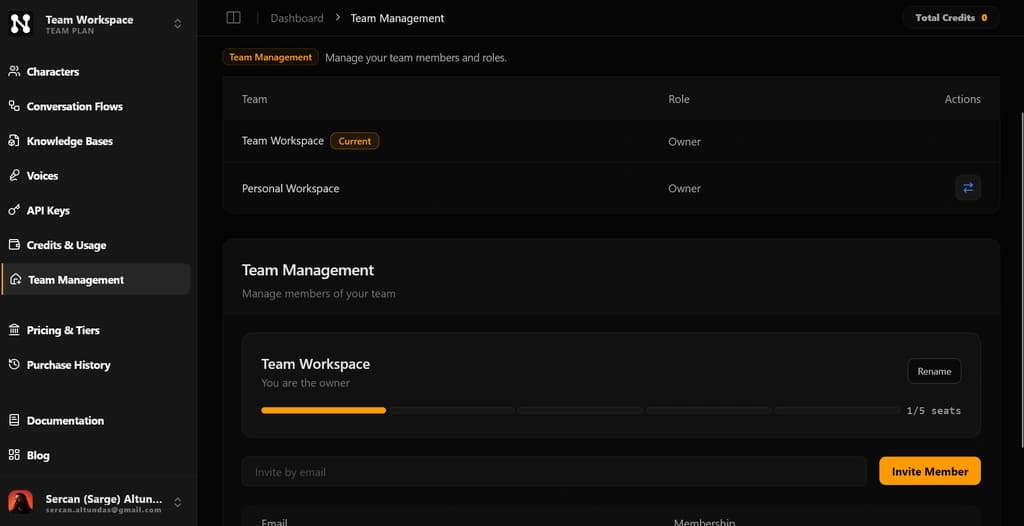
Managing Your Team
The Team Management page serves as the control center for your collaborative environments. From here, you can oversee both teams you own and those you have joined as a member.
Owner Capabilities
If you are the owner of a team workspace, you have full administrative control:
- Invite Members: Send invitations to add new collaborators to your workspace.
- Remove Members: Revoke access for any member at any time.
- Member Overview: View a complete list of all active contributors within your team.
Team Overview
Users can view a consolidated list of all teams they are currently associated with, whether they are the owner or an invited member.
Switching Workspaces
Neocortex makes it easy to jump between your personal and team environments using two quick methods:
- Workspaces List: Click the Switch button next to any team in your team list to immediately enter that workspace.
- Top Navigation: Click the Neocortex Logo on the top left of the dashboard to open the workspace switcher and toggle between your available environments instantly.