
Neocortex Audio Receiver
One microphone component for every platform
NeocortexAudioReceiver is the microphone. Add it anywhere in the scene and voice input works on desktop, mobile and WebGL. It spawns the right capture backend for the target platform internally, handles the Android and iOS permission prompt, and owns microphone selection, so your game never touches the platform layers.
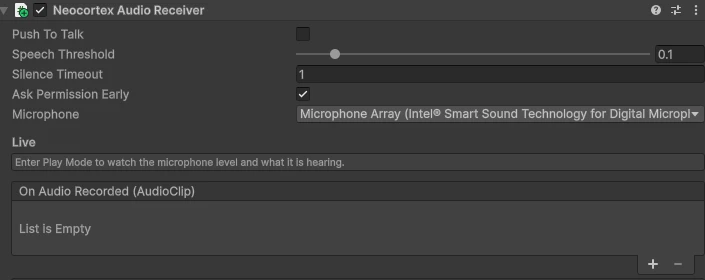
Anything that takes an AudioReceiver, such as NeocortexAudioChatInput, accepts it directly.
You often do not add it yourself. Picking an audio Chat Lines Mode on a Smart Agent adds one if the scene has no microphone yet, and with Auto Voice Input on the agent records and answers through it without any wiring. Add it by hand when you want to drive recording yourself.
Inspector
| Field | Description |
|---|---|
| Use Push To Talk | Hold a button to record instead of listening for speech. Switchable at runtime. |
| Amplitude Threshold | How loud speech must be to start recording, in voice activity mode. |
| Max Wait Time | Stop automatically after this long without sound. |
| Request Permission On Start | Ask for microphone permission as the component starts, instead of on the first recording. |
It shows you what it hears
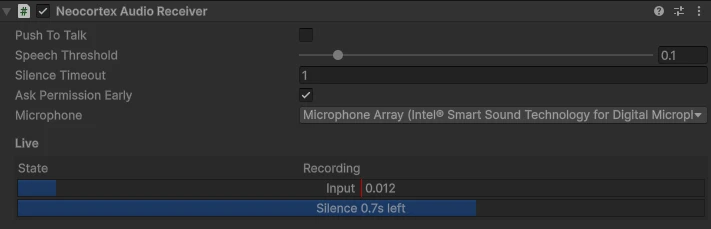
In Play Mode the inspector turns into a live readout: the current state (Waiting User Input, Recording or Busy), the input level with a marker at the speech threshold, and the silence timeout draining to zero. A scene with no chat UI is still readable.
Methods
StartMicrophone
Begin listening. Waits for permission first, and raises OnRecordingFailed if it is denied.
var mic = GetComponent<NeocortexAudioReceiver>();
var agent = GetComponent<NeocortexSmartAgent>();

mic.OnAudioRecorded.AddListener((clip) => agent.AudioToAudio(clip));
mic.StartMicrophone();
StopMicrophone
Stop listening. In voice activity mode the clip is cut and OnAudioRecorded is raised.
mic.StopMicrophone();SelectMicrophone
Picks an input device by its index in Microphones. The selection is remembered between sessions and can be changed while the game is running. NeocortexMicrophoneDropdown is a ready made picker for this.
- Parameters:
- index: Index of the device in the
Microphonesarray.
SelectMicrophone Example string[] devices = mic.Microphones; mic.SelectMicrophone(1); Debug.Log($"Recording with {devices[mic.SelectedMicrophoneIndex]}"); - index: Index of the device in the
SetPushToTalk
Switches between voice activity and push to talk at runtime, so you can offer it as a settings toggle. In voice activity mode the microphone listens continuously and cuts a clip when speech starts and stops. In push to talk it records only while the button is held.
- Parameters:
- enabled:
truefor push to talk,falsefor voice activity.
SetPushToTalk Example mic.SetPushToTalk(true); // same as mic.usePushToTalk = true - enabled:
SetCustomReceiver
Swaps in a different capture implementation, for a test feed or a third party microphone stack. It replaces and destroys the spawned platform backend.
- Parameters:
- custom: Your own
AudioReceiver.
- custom: Your own
Events
OnAudioRecorded
Raised when a recording finishes.
- Arguments:
- audioClip: The recorded clip, ready to send to an agent.
OnAudioRecorded Example mic.OnAudioRecorded.AddListener((clip) => agent.AudioToText(clip));
OnRecordingFailed
Raised when recording could not start.
- Arguments:
- error: The reason, for example a denied permission or no available device.
OnRecordingFailed Example mic.OnRecordingFailed.AddListener((error) => Debug.LogWarning(error));
OnPermissionGranted
Raised when microphone permission is granted, on the platforms that ask.
mic.OnPermissionGranted.AddListener(() => recordButton.interactable = true);OnPermissionDenied
Raised when microphone permission is refused. Use it to fall back to text input.
mic.OnPermissionDenied.AddListener(() => ShowTextOnlyChat());For your own UI, IsListening, IsUserSpeaking and Amplitude expose the live state the inspector readout draws from, and Microphones lists the available devices.
Platform notes
| Platform | Behaviour |
|---|---|
| Desktop | Records directly, no permission prompt. |
| Android and iOS | The permission prompt is handled for you, surfaced through the permission events. |
| WebGL | The browser owns the microphone and prompts on its own. The Neocortex WebGL template is required, see Sample Projects. |