
Knowledge Base
Upload documents to the Neocortex Knowledge Base and connect them to your AI characters with a Knowledge node, so they can use that information in conversation.
The Knowledge Base allows you to upload documents that provide additional context for your Smart NPCs in Neocortex. These documents can contain relevant information that NPCs reference when interacting with users, enhancing their responses with deeper, customized knowledge.
You can access the Knowledge Base section via the sidebar in the Neocortex dashboard.
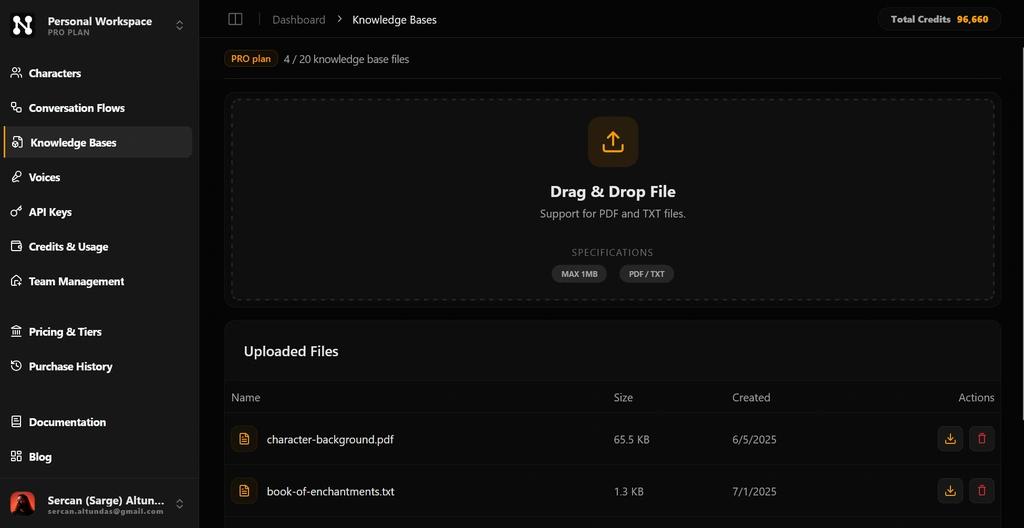
Uploading Files
To upload files to the Knowledge Base:
- Navigate to the Knowledge Base section from the sidebar.
- Click the
Upload Filearea or drag and drop a file into the upload area. - Select the file you wish to upload (PDF and TXT files are currently supported).
- The file will be processed and added to your Knowledge Base.
- You can download or delete any uploaded file at any time.
Note
- Only one file can be uploaded at a time.
- Supported file formats are PDF and TXT.
- A maximum of 10 files is allowed.
- Each file must be under 1MB in size.
Adding a Knowledge Base Node
To use an uploaded file within your Smart NPC:
- Open a project in Neocortex.
- Click the
Add Nodebutton. - Select
Knowledgefrom the list of node types. - Choose the desired file from your uploaded documents.
- Attach the Knowledge Base node to either an Agent node or a World node.
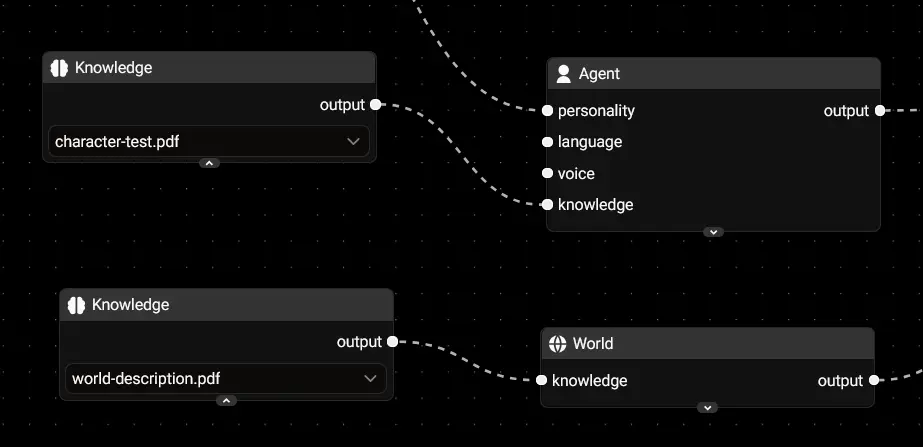
This integration enables your NPCs to reference the uploaded material and incorporate its content into conversations in real time.
Voice Clones
Give AI characters unique voices in Neocortex by cloning a voice from an audio sample or designing a new one from a text prompt, and manage your voice library.
API Keys
Create, view and manage API keys in the Neocortex dashboard for your games and apps, and set per-player and per-character usage limits for each workspace.